

Product Support & Resources

Featured Products

Honeywell Air Purifier Help, Guides & Buying Advice

Get more from your Honeywell air purifier with practical setup instructions, filter guides, maintenance tips, operating advice, and solutions for common indoor air-quality concerns. Whether you are setting up a new purifier, searching for the correct replacement filter, or deciding which model is right for your room, the Honeywell Air Purifier Support Center can help.

Browse the support topics below to learn how Honeywell air purifiers work, where to place your unit, how to use its controls, and how to maintain strong airflow and filtration performance throughout the year.

Getting Started With Your Honeywell Air Purifier

How Honeywell Air Purifiers Work

Learn how Honeywell air purifiers pull room air through their filters and return cleaner air to the surrounding space. This guide compares traditional True HEPA filtration with Honeywell ifD® electronic filtration and explains particle capture, airflow, carbon pre-filters, and ozone certification.

Learn how Honeywell air purifiers work

First-Time Setup Guide

Follow the correct steps for taking a Honeywell air purifier out of the box, removing exterior packaging, opening the filter compartment, and removing the protective plastic from every internal filter before startup.

Set up your Honeywell air purifier

Room Placement Guide

Find the best place to put your purifier in a bedroom, living room, office, or other space. Learn how much clearance the unit needs and whether a floor, table, nightstand, or corner location is appropriate.

Find the best purifier placement

Sizing, CADR & Room Coverage

Compare room square footage, Clean Air Delivery Rate, and air changes per hour to determine what size Honeywell air purifier you need for a bedroom, office, living room, basement, or open-concept area.

Choose the correct air purifier size

Settings, Controls & Everyday Operation

Understanding Honeywell Air Purifier Settings and Controls

Learn what the control-panel buttons and indicator lights mean on Honeywell HPA, InSight®, and PowerPlus® air purifiers. The guide explains Germ, General Clean, Allergen, Pollen, Turbo, and Auto modes, along with VOC indicator colors, dimmer controls, timers, and filter reminders.

  • Choose the right cleaning level for everyday use or allergy season.
  • Understand green, yellow, and red air-quality lights.
  • Use the 2-, 4-, or 8-hour automatic shutoff timer.
  • Dim or turn off panel lights for overnight operation.
  • Identify the difference between a red air-quality light and a filter reminder.

Explore Honeywell air purifier controls

Replacement Filters & Maintenance

How to Replace Honeywell Air Purifier Filters

Follow a step-by-step process for removing used filters, installing new filters in the correct direction, removing protective plastic packaging, and resetting the Check Filter or Check Pre-Filter reminder.

Replace and reset your filters

Filter Types & Compatibility Guide

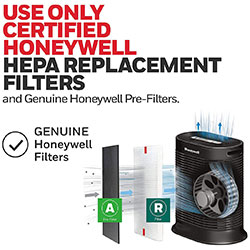
Use the Honeywell replacement filter alphabet guide to compare Filter A, B, C, F, G, H, J, K, O, R, S, T, and U. Find common part numbers, filtration types, replacement schedules, and compatible purifier families.

Find the correct Honeywell replacement filter

Honeywell Air Purifier Cleaning Guide

Learn how to clean the exterior housing, intake grilles, and outlet vents without damaging the purifier. The guide also explains which permanent ifD® filters can be washed and why disposable True HEPA and carbon filters must remain dry.

Clean and maintain your air purifier

Recommended Filter Maintenance

Filter life depends on purifier runtime and indoor conditions, but many Honeywell systems follow these general maintenance intervals:

  • Carbon pre-filter: Approximately every 3 months
  • True HEPA filter: Approximately every 12 months
  • Washable ifD® filter: Clean as directed for the model
  • Exterior vents: Inspect and clean monthly

Solutions for Allergies, Smoke & Indoor Comfort

Air Purifiers for Allergies

Discover how True HEPA filtration helps capture airborne pollen, pet dander, dust-mite debris, mold spores, and household dust. Learn when to use Honeywell Allergen Mode and how to improve overnight filtration in a bedroom.

Find an air purifier for allergy concerns

Air Purifiers for Wildfire Smoke

Learn how True HEPA and activated carbon filtration work together to address wildfire smoke particles and odors. The guide includes emergency operating settings, clean-air room tips, purifier placement, and smoke-event filter maintenance.

Improve indoor air during wildfire smoke

Air Purifier vs. Humidifier

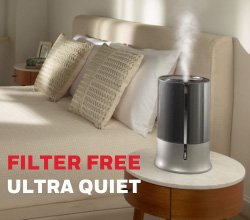
Compare the different jobs performed by air purifiers and humidifiers. Learn which appliance may be more helpful for airborne allergens, dry skin, congestion, smoke, pet dander, or low indoor humidity—and how to use both appliances safely in the same room.

Compare air purifiers and humidifiers

Choosing a Purifier for Your Home

For the best results, choose a purifier based on the size of the room and the pollutant you want to address. Consider certified room coverage, smoke CADR, filter type, operating noise, replacement-filter costs, and whether you need specialized settings such as Allergen, Auto, or Turbo.

Compare room sizes and purifier capacity

Get Better Performance From Your Honeywell Air Purifier

A Honeywell air purifier performs best when it is correctly sized, placed in an open location, operated consistently, and maintained with the proper filters. Keep intake and outlet vents unobstructed, inspect filters regularly, and choose the cleaning level that matches current room conditions.

Explore the guides above to troubleshoot common questions, find compatible replacement filters, and create a cleaner and more comfortable indoor environment.

Related Products

Related Support Topics

Explore related support articles and resources for this topic.

View All Product Support Topics

Haven't found the answer? We can help.

Contact Us

Contact options may differ depending on the type of help you need.

0 $0.00
Top