When checking out, simply select the "New Customer" option. All you need to get started is a valid email address and a secure password of your choosing. After your purchase is complete, your account will be created, and you will immediately gain all the benefits of being an account holder. If you have previously placed an order with us as a guest, you can try using the "Forgot Password" feature under the "Sign In" tab.
Benefits of having an account:
Real-time status updates on all your orders and returns.
Ability to view detailed order history.
Eligibility to enroll in subscription items for recurring discounts.
Access to more store features and quicker customer support.
Connection to a dedicated sales representative if placing bulk orders.
Manage your account settings:
Update your email address and password.
Unsubscribe from email promotions.
Manage item subscriptions.
Delete your account and remove your information.
We respect your privacy and are committed to protecting any personal information you may provide us through our Website. View our privacy policy for more info.
Keeping your Honeywell air purifier clean is one of the easiest ways to maintain strong airflow, improve filtration
performance, and help extend the life of the fan motor. Dust that accumulates on intake grilles, outlet vents, and
washable filters can restrict airflow, reducing your purifier's Clean Air Delivery Rate (CADR) and overall
effectiveness.
This guide explains how to clean Honeywell air purifiers, which filters can safely be washed, and
which filters should always be replaced instead of cleaned.
Why Regular Cleaning Matters
Even if your filters are replaced on schedule, dust naturally builds up on the exterior housing and air intake
openings over time. Cleaning these areas helps maintain proper airflow so your Honeywell air purifier can
efficiently circulate clean air throughout your home.
Benefits of Routine Cleaning
Maintains maximum airflow and CADR performance.
Reduces strain on the fan motor.
Improves filtration efficiency.
Helps reduce operating noise caused by restricted airflow.
Extends the overall life of your air purifier.
Step 1: Clean the Exterior Housing, Intake Grilles & Air Vents
Cleaning the outside of your Honeywell air purifier should be part of your regular maintenance routine, especially
in homes with pets or higher dust levels.
Cleaning the Exterior
Turn the air purifier OFF.
Unplug the power cord from the wall outlet.
Wipe the exterior housing with a soft, slightly damp cloth.
Do not spray cleaners directly onto the purifier.
Allow the housing to dry completely before reconnecting power.
Avoid abrasive cleaners, scouring pads, bleach, or solvents that could damage the finish or plastic
components.
Cleaning Dust Out of the Intake & Exhaust Vents
Dust often collects around the intake grilles and clean-air outlet vents. Removing this buildup helps restore
unrestricted airflow.
Cleaning the Airflow Path
Use a vacuum cleaner with a soft brush attachment to remove dust from intake grilles.
Vacuum around the exhaust vents to remove loose debris.
If needed, use short bursts of compressed air to blow dust from difficult-to-reach openings.
Never insert tools or objects into the fan assembly.
Regularly removing dust bunnies from the intake and outlet vents helps your Honeywell air purifier maintain
consistent airflow and cleaning performance.
Can You Wash a Honeywell HEPA Filter?
This is one of the most common questions Honeywell air purifier owners ask and the answer depends entirely on the
type of filter installed in your purifier.
Important Filter Cleaning Warning
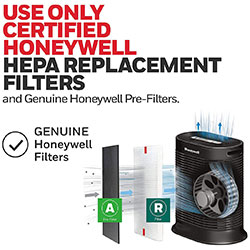
Standard True HEPA filters and disposable carbon pre-filters are NOT washable.
Disposable filters such as Honeywell Filter R True HEPA filters and
Filter A Carbon Pre-Filters are manufactured using specialized filtration media. Washing
them damages the microscopic fiber structure that captures airborne particles and permanently reduces
filtration performance.
Do NOT:
Wash disposable HEPA filters.
Vacuum disposable HEPA filters.
Soak carbon pre-filters.
Attempt to clean disposable filters with compressed air.
When these filters become dirty or reach the recommended replacement interval, they should simply be
replaced with genuine Honeywell replacement filters.
Some Honeywell air purifiers, including select AirGenius and QuietClean models,
use permanent washable filters instead of disposable HEPA filters. These filters are specifically designed to be
cleaned and reused.
How to Clean a Honeywell Washable Filter
Step 1: Remove the Filter
Turn the air purifier OFF.
Unplug the power cord.
Open the filter access panel.
Carefully slide out the permanent ifD® filter tower or washable plastic mesh pre-filter.
Step 2: Wash the Filter
Fill a sink or basin with lukewarm water.
Submerge the filter completely.
For heavier buildup, add a few drops of mild dish soap.
Gently swish the filter through the water.
Avoid scrubbing aggressively or bending the filter.
Step 3: Rinse Thoroughly
Rinse the filter under clean running water until all soap residue has been removed.
Step 4: Allow the Filter to Dry Completely
Place the washed filter in a well-ventilated location and allow it to air dry completely for
at least 24 hours, or until it is completely dry to the touch.
Critical Safety Warning
Never reinstall a damp washable filter.
Operating your Honeywell air purifier with a wet or partially damp filter may:
Create an electrical hazard.
Encourage mold or mildew growth inside the purifier.
Damage internal electronic components.
Reduce airflow.
Lead to permanent motor failure.
Always allow washable filters to dry naturally until they are completely dry before reinstalling them.
Routine Cleaning Schedule
Maintenance Task
Recommended Frequency
Wipe exterior housing
Monthly
Vacuum intake and outlet vents
Monthly
Clean washable ifD® filter
Approximately every 1–3 months (or as needed)
Replace disposable carbon pre-filters
Every 3 months
Replace disposable True HEPA filters
Up to every 12 months
Frequently Asked Questions
How often should I wash my permanent Honeywell filter?
Most Honeywell washable ifD® filters should be cleaned approximately every one to three months, depending on
your home's air quality, pets, and daily operating time. If you notice visible dust buildup or reduced airflow,
clean the filter sooner.
What happens if I turn the machine on while the filter is still slightly damp?
Running the purifier with a damp filter can create electrical hazards, encourage mold growth, restrict airflow,
and potentially damage the motor. Always allow washable filters to air dry completely - typically at least 24
hours - before reinstalling them.
Can I use a hairdryer to speed up the drying process?
No. High heat from a hairdryer or other heating appliance can warp plastic components or damage the filter
material. Allow washable filters to dry naturally in a well-ventilated area until they are completely dry.
Can I vacuum a disposable Honeywell True HEPA filter?
No. Vacuuming a disposable True HEPA filter can damage the delicate filtration media and reduce its ability to
capture microscopic airborne particles. Disposable HEPA filters should be replaced rather than cleaned.
Can I use household cleaners or disinfectants on my air purifier?
For routine cleaning, use only a soft, damp cloth on the exterior housing. Avoid spraying liquids directly into
the air purifier or using harsh chemicals that could damage the finish or internal components. Always unplug the
unit before cleaning.
Explore Honeywell air purifier guides to troubleshoot common questions, find compatible replacement filters, and create a cleaner and more comfortable indoor environment.
Contact options may differ depending on the type of help you need.
Cookie Preferences
This site uses a small number of cookies to provide a secure and reliable shopping experience.
Required cookies are set directly by this site and are used only for essential store functions such as maintaining your shopping cart, processing checkout, providing security, and keeping the site working properly. We also use optional Google cookies for website analytics and advertising measurement. You can choose whether to allow these Google cookies below.
Required Cookies
These cookies are necessary for essential website functions, including your shopping cart, checkout, site security, and maintaining your shopping session. These cookies are set directly by this site and cannot be disabled.
Always Active
Google Analytics & Advertising Cookies
We use Google services to understand how customers use this site, improve site performance and navigation, and measure the effectiveness of our advertising. These cookies are optional. Turning them off will not affect your ability to browse, shop, or complete an order.
Learn more about how we protect your information in our Privacy Policy.