



Product Support & Resources

Featured Products

How to Fix a Honeywell Fan That Is Not Oscillating or Running Slow

A Honeywell fan not oscillating may have an incorrect control setting, an obstruction around the rotating base or a mechanical problem inside the oscillation assembly. A Honeywell fan running slow usually points to a speed setting, restricted airflow, dust-covered blades or an internal motor problem.

Begin by determining whether only the oscillation feature has stopped or whether the main fan motor is also running slowly. This distinction will help you avoid unnecessary disassembly.

Quick Diagnostics and Safety

Always turn off and unplug the fan before inspecting the base, grille, blade or other moving components. Do not open the motor housing or internal gearbox for routine troubleshooting.

Determine which symptom applies:

  • The fan produces full airflow but does not move from side to side.
  • The fan attempts to oscillate but stops partway.
  • The base clicks or grinds without turning.
  • The oscillation button illuminates but the fan remains stationary.
  • The fan runs slowly at every speed setting.
  • The motor hums while the blade or drum barely moves.
  • Airflow is weak even though the motor sounds normal.
  • The fan works properly until oscillation is activated.

Determine Whether the Problem Is Oscillation or Fan Speed

Test the Fan Without Oscillation

  1. Place the fully assembled fan on a dry, hard and level surface.
  2. Make sure the power cord is clear of the base.
  3. Turn oscillation off.
  4. Run the fan at its lowest speed.
  5. Increase the speed one level at a time.
  6. Observe whether airflow becomes noticeably stronger.
  7. Activate oscillation and watch the base or fan head.

If airflow is strong while the fan remains stationary, focus on the oscillation controls and base. If the blade or internal drum also turns slowly, begin with the airflow and main-motor checks.

Listen to the Motor

  • Normal airflow sound with no side-to-side movement: Oscillation control or mechanism problem
  • Clicking with partial movement: Obstruction, loose base or worn internal gear
  • Humming with little blade movement: Obstruction or internal motor fault
  • Normal motor sound with weak airflow: Dust-blocked grille or dirty blades
  • Grinding during oscillation: Stop using oscillation and inspect the external base

Cause 1: Mechanical Obstructions and Assembly Problems

The simplest explanation for a fan that will not oscillate is something physically restricting its movement. Check the area around the fan before assuming that its internal mechanism has failed.

Check the Oscillation Clearance

  1. Turn off and unplug the fan.
  2. Move it away from walls, furniture and other appliances.
  3. Remove curtains, cords and papers that can contact the housing.
  4. Check that the rear of the fan will not strike a wall during its sweep.
  5. Place the fan in an open area and test it again.

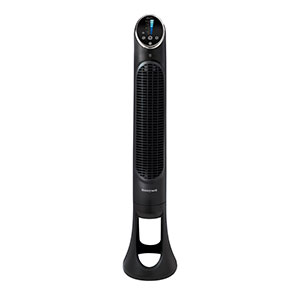
A tower fan should have enough clearance to complete its designed oscillation arc without the housing contacting nearby objects.

Inspect the Power Cord

Cord tension can pull against a rotating fan or become trapped between moving base sections.

  • Do not wrap the cord tightly around the base.
  • Keep the cord out of the oscillation path.
  • Provide enough slack for the fan to complete its sweep.
  • Do not place furniture or other objects on the cord.
  • Inspect the cord for crushing, cuts or exposed wiring.

Check for a Honeywell Fan Base Assembly Cord Obstruction

A Honeywell fan base assembly cord obstruction can occur when the cord is not pressed into its molded channel or rear exit notch.

  1. Unplug the fan.
  2. Place it carefully on its side on a padded surface.
  3. Check that the base halves are completely snapped together.
  4. Inspect the locking collar, nut, thumb screws or base screws.
  5. Release the cord from any incorrect position.
  6. Route it through the molded guides inside the base.
  7. Direct it through the designated rear notch.
  8. Confirm that the cord does not cross the rotating base or pass underneath it.
  9. Return the fan upright before testing.

A pinched cord is an electrical hazard. Do not use the fan if its insulation has been crushed or damaged.

Tighten Approved Base Components

A loose locking nut or pedestal connection may allow the housing to wobble or sit out of alignment.

  • Confirm that the tower housing is fully seated in the base.
  • Tighten the locking collar in the direction specified by the manual.
  • Install all supplied thumb screws.
  • Check that base halves are flush with one another.
  • Do not overtighten screws installed in plastic.

Cause 2: Stuck Oscillation Controls

Manual Push-and-Pull Oscillation Knobs

Some pedestal and tabletop fans use an oscillation pin or knob on top of the motor housing. Depending on the model, pushing the knob down starts oscillation and pulling it up stops oscillation.

If the Honeywell fan oscillation knob is stuck:

  1. Turn off and unplug the fan.
  2. Remove exterior dust from around the knob using a vacuum or dry brush.
  3. Check whether the knob is tilted or visibly damaged.
  4. Gently move it in the direction shown in the manual.
  5. Do not twist a knob designed only to move vertically.
  6. Do not use pliers or excessive force.
  7. Reconnect power and test the feature.

A knob that will not move after external cleaning may be jammed inside the gearbox. Do not force it because the plastic shaft or linkage can break.

Digital and QuietSet Oscillation Controls

Digital models generally activate oscillation by pressing the oscillation button once. Pressing it again turns the feature off.

  1. Test the fan using the physical control panel instead of the remote.
  2. Press the oscillation button once.
  3. Check whether an oscillation indicator illuminates.
  4. Wait several seconds for the base to begin moving.
  5. Press the button again to turn the feature off.
  6. Test the remote separately after confirming the panel works.

Power-Cycle the Electronic Controls

  1. Turn off the fan.
  2. Unplug it for approximately five minutes.
  3. Reconnect it directly to a known-working wall outlet.
  4. Turn the fan on using the physical power button.
  5. Select a normal speed.
  6. Press the oscillation button once.

This may clear a temporary electronic condition, but it is not a universal factory reset. If the indicator responds but the base does not move, the problem may be mechanical or electrical inside the oscillation assembly.

Honeywell Fan Linkage Arm Alignment

Inside many oscillating fans, a linkage arm converts the gearbox’s rotation into side-to-side movement. A detached, cracked or bent arm can leave the main fan operating normally while oscillation fails.

Possible signs of a linkage problem include:

  • The fan moves only partway through its sweep.
  • The fan can be moved freely by hand but will not move under power.
  • Clicking occurs at the same point during every sweep.
  • The oscillation knob moves but does not engage anything.
  • The base jerks instead of moving smoothly.

Honeywell fan linkage arm alignment is normally an internal service procedure. The linkage may be located inside the motor or electrical housing, which Honeywell owner instructions warn users not to open.

Do Not Operate the Fan With a Loose Internal Linkage

A detached linkage can contact wiring, the motor or other moving components. If oscillation produces internal knocking, grinding or visible jerking, turn oscillation off and contact a qualified technician.

Cause 3: Oscillation Gearbox or Motor Failure

Signs of Stripped or Worn Gears

  • Repeated clicking without side-to-side movement
  • Oscillation that stops at one position
  • Movement in one direction but not the other
  • A knob that will not remain engaged
  • Grinding from inside the motor housing
  • An oscillating base that can no longer support the housing correctly

Honeywell Tower Fan Oscillation Motor Failure

A suspected Honeywell tower fan oscillation motor failure may be present when the main blower runs normally, the oscillation indicator illuminates and the base remains stationary after obstructions and assembly problems are eliminated.

The fault could involve:

  • Failed synchronous oscillation motor
  • Worn plastic gearbox
  • Detached linkage
  • Loose internal electrical connection
  • Failed control-board output

These causes cannot be confirmed safely from the exterior. Contact consumer support or a qualified appliance technician.

Should You Clean and Grease the Oscillation Gears?

Do not spray lubricant or push grease through the base seam. Accessing the gears generally requires opening the motor or electrical housing.

Silicone-compatible grease may be used during an authorized repair involving nylon gears, but lubricant compatibility, quantity and placement are model-specific. Incorrect grease can degrade plastic, contaminate electrical parts or attract more debris.

A technician with model-specific service information should clean and lubricate an internal gearbox. Do not use WD-40 Multi-Use Product as gearbox grease.

Cause 4: Honeywell Fan Running Slow

A Honeywell fan spinning slow and weak may simply be operating in a low-noise mode, or it may have restricted airflow, an obstructed blade or an internal motor problem.

Check the Selected Speed

Some QuietSet fans start in a low Sleep setting. Press the speed button repeatedly to cycle through the available airflow levels.

  1. Turn off oscillation temporarily.
  2. Select the lowest speed and note the airflow.
  3. Increase the speed one level at a time.
  4. Check that the display or indicator changes.
  5. Cancel automatic temperature or timer settings when equipped.

If the indicators change but motor speed does not, the control board, capacitor or motor may require service.

Clean Restricted Airflow

  1. Turn off and unplug the fan.
  2. Vacuum the rear intake grille with a soft brush attachment.
  3. Vacuum the front outlet grille.
  4. Use a flexible dust wand to loosen debris between narrow openings.
  5. Apply short bursts of compressed air through the grille.
  6. Vacuum again to collect loosened dust.
  7. Keep water and cleaning solution out of the motor housing.

Dust can reduce perceived airflow even when motor speed remains normal.

Inspect an Accessible Fan Blade

For a model whose manual permits front-grille removal:

  1. Unplug the fan.
  2. Remove the grille using the approved procedure.
  3. Remove hair, string and dust from the blade and hub.
  4. Inspect the blade for cracks or warping.
  5. Gently verify that the blade turns without scraping the rear grille.
  6. Reinstall the front grille before applying power.

Do not reach through a tower-fan grille or attempt to rotate its internal cylindrical drum with a tool.

Check Blade Balance and Seating

On a pedestal model with an owner-removable blade, check that the blade slots are fully seated on the motor-shaft drive points and that the blade knob is tightened in the direction specified by the manual.

Do not bend a blade in an attempt to balance it. Replace a cracked or severely warped blade with a compatible part.

Possible Motor or Capacitor Failure

If the motor hums, starts slowly or runs at nearly the same weak speed on every setting, possible internal causes include:

  • Worn motor bearings
  • Failed or weakened motor capacitor
  • Damaged motor winding
  • Internal control-board failure
  • Persistent obstruction inside the housing

Turn off a humming or stalled fan promptly. Continued operation can cause additional overheating.

Should You Apply Oil to the Motor Spindle?

Do not apply non-detergent 3-In-One oil, synthetic oil, silicone spray or another lubricant through the grille or motor vents. Honeywell owner manuals do not provide a universal spindle-lubrication procedure.

A serviceable bearing may require a specific lubricant during professional repair, but some motors use sealed bearings that should not be oiled. Applying the wrong product can contaminate electrical components or damage the motor.

Check the Power Source

Low or intermittent power can also affect motor performance.

  • Plug the fan directly into a working wall outlet.
  • Do not use an extension cord or power strip when prohibited by the manual.
  • Test another outlet.
  • Stop using an outlet that feels loose or makes the plug excessively hot.
  • Inspect the fused safety plug and cord for damage.

Honeywell Portable Fan Setup Verification

Complete this Honeywell portable fan setup check after cleaning or correcting the base:

  • The fan stands upright on a hard, level surface.
  • The base halves are completely connected.
  • The locking collar and thumb screws are secure.
  • The cord is inside its molded channel.
  • The cord has enough slack for oscillation.
  • The intake and outlet grilles are clear.
  • No curtains, walls or furniture obstruct the oscillation path.
  • The blade or fan drum does not contact the housing.

Post-Troubleshooting Test

  1. Place the fully assembled fan upright.
  2. Plug it directly into a suitable wall outlet.
  3. Run it at low speed without oscillation.
  4. Increase the speed one level at a time.
  5. Listen for clicking, humming, scraping or grinding.
  6. Activate oscillation and watch one complete sweep.
  7. Turn off and unplug the fan if it stalls, jerks or produces an unusual mechanical sound.
When to Contact Product Support
  • The oscillation indicator illuminates but the base never moves.
  • The fan clicks, grinds or stops at the same point in every sweep.
  • The oscillation knob is jammed after exterior cleaning.
  • The motor hums or requires a push to start.
  • The fan runs at one weak speed regardless of the selected setting.
  • The blade, drum, cord or housing is damaged.
  • Repair requires opening the motor or electrical housing.

Honeywell Fan Oscillation and Speed Questions

Why Does My Honeywell Fan Blow Air but Not Oscillate?

The oscillation control may be off, the base may be obstructed or the internal linkage, gear or oscillation motor may have failed. Check the control, cord routing and external clearance first.

Why Does the Fan Click Without Turning?

Clicking can indicate an obstruction, an incorrectly assembled base or worn internal gearbox teeth. Discontinue oscillation if the clicking persists after external checks.

Why Is My QuietSet Fan Running So Slowly?

QuietSet models may start in a low Sleep mode. Increase the speed setting and clean the intake grille. If the display changes but speed does not, the motor or electronic controls may require service.

Can I Force the Fan to Oscillate by Hand?

No. Forcing a powered or unpowered oscillation mechanism can damage its linkage and gears. Move the fan to the desired stationary position only when its manual permits manual positioning.

Can I Oil a Slow Honeywell Fan?

Do not pour or spray oil through the grille. Sealed and serviceable motors have different lubrication requirements, and the wrong oil or application point can cause damage.
Related Products

Related Support Topics

Explore related support articles and resources for this topic.

View All Product Support Topics

Haven't found the answer? We can help.

Contact Us

Contact options may differ depending on the type of help you need.

0 $0.00
Top