





Thermostat Guides and Support
Find Honeywell thermostat support for choosing the right model, installation, wiring, programming, troubleshooting, battery replacement, resets and everyday use.
Related Topics:

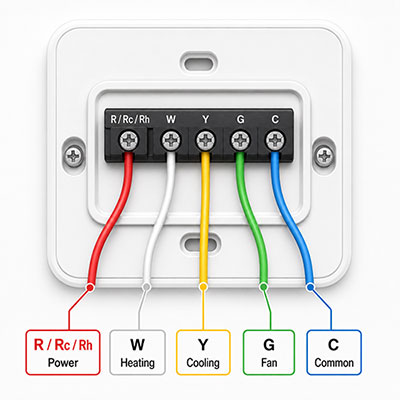
Learn how to understand thermostat wire colors, terminal letters, C-wire connections, 4-wire systems, 5-wire setups and heat pump wiring before installing or replacing your Honeywell thermostat.
This thermostat wiring diagram and guide is designed to help you understand the most common low-voltage thermostat wires used with Honeywell thermostats. While many systems use familiar terminal labels such as R, G, Y, W and C, wiring can vary depending on the HVAC equipment, thermostat model and previous installation.
The most important rule is simple: match wires by terminal label, not by color alone. Thermostat wire colors often follow industry conventions, but they are not guaranteed. Always label the wires based on the terminals they were connected to on the old thermostat before removing them.
Always shut off power to your HVAC system before touching thermostat wires. Turn off power at the breaker panel, furnace switch or HVAC service switch before removing the thermostat faceplate, disconnecting wires or installing a new thermostat.
Many Honeywell thermostats are designed for low-voltage HVAC systems, but not every home uses the same wiring. Do not install a low-voltage thermostat on a high-voltage or line-voltage system. High-voltage thermostat wiring may use thicker wires, wire nuts or voltage ratings that are not compatible with standard low-voltage thermostats.
If you are unsure what type of wiring you have, if wires are damaged or unlabeled, or if your system does not match the thermostat installation instructions, contact a licensed HVAC professional.
A thermostat wiring diagram shows how each wire connects to a labeled terminal on the thermostat base plate. The terminal letter is more important than the wire color because the terminal identifies the function of that wire.
| Terminal | Common Wire Color | Typical Function |
|---|---|---|
| R | Red | 24V power from the HVAC transformer. |
| Rc | Red | Cooling power. Used when heating and cooling have separate power terminals. |
| Rh | Red | Heating power. Used when heating and cooling have separate power terminals. |
| G | Green | Indoor fan control. |
| Y | Yellow | Cooling or compressor control. |
| W | White | Heating control for many conventional systems. |
| C | Blue or black | Common wire that provides continuous power for many smart thermostats. |
| O/B | Orange or dark blue | Heat pump reversing valve control. |
These thermostat wire colors are common, but they are not universal. A blue wire is often used as the C-wire color, but a C-wire could also be black or another color depending on how the system was wired. Always confirm the terminal label before connecting wires to a Honeywell thermostat.
A basic thermostat wiring diagram helps identify which wire controls power, heat, cooling, fan and common power. Most standard forced-air systems use a combination of the terminals below.
The R terminal provides 24V power from the HVAC system. Some thermostats separate this into Rc for cooling power and Rh for heating power. Many modern thermostats use an internal jumper or setting, while some older thermostats may have a physical jumper wire between Rc and Rh.
The G terminal controls the indoor blower fan. When the thermostat fan setting is changed from Auto to On, the G wire is usually what allows the fan to run independently of heating or cooling.
The Y terminal controls cooling or compressor operation. In many conventional systems, the Y wire tells the air conditioner or heat pump compressor to turn on when cooling is needed.
The W terminal controls heating on many conventional furnace systems. Multi-stage systems may use additional terminals such as W2 or AUX, depending on the thermostat and HVAC equipment.
The C terminal is the common wire connection. Many smart thermostats use the C-wire for continuous power so the display, Wi-Fi connection and smart features can operate reliably.
Traditional 4-wire thermostat systems often control basic heating, cooling and fan operation without a dedicated C-wire. Modern 5-wire thermostat setups usually add a C-wire for continuous power, which is especially useful for smart thermostat installation.
A common 4-wire thermostat setup may include:
A 4-wire system may work with many standard programmable or non-programmable thermostats. However, some smart thermostats may require a C-wire or compatible adapter if no common wire is available.
A common Honeywell 5 wire thermostat diagram may include:
A 5-wire setup is often preferred for smart thermostats because the C-wire helps power the thermostat without relying only on batteries or power-sharing methods.
The C-wire is one of the most common wiring questions for smart thermostats. The C terminal provides common power from the HVAC control board, helping the thermostat maintain Wi-Fi, display and scheduling functions.
The most common C-wire color is blue, but black is also common. In some systems, a spare unused wire may be available behind the thermostat, but that does not always mean it is connected to the C terminal at the HVAC control board.
If you are not comfortable confirming C-wire connections at the HVAC control board, contact a professional installer.
Heat pump systems often use different thermostat wiring than conventional furnace and air conditioning systems. A heat pump may use an O or B terminal to control the reversing valve, which switches the system between heating and cooling operation.
In many heat pump wiring color code examples, the O wire is commonly orange and the B wire may be dark blue. However, wire colors can vary, and some systems use O while others use B depending on the equipment brand and configuration.
Heat pump wiring can be more complex than standard thermostat wiring. Make sure your Honeywell thermostat is set up for the correct system type during installation and configuration.
Labeling wires correctly is one of the best ways to avoid thermostat wiring mistakes. The label should match the terminal on the old thermostat, not the wire color.
If any wire is unlabeled, damaged or connected to a terminal you do not recognize, stop and review your thermostat manual or contact an HVAC professional.
Newer Honeywell thermostats may use slightly different terminal labels than older thermostats. Some models use shared terminals, internal jumpers or setup menus that define whether the system is conventional, heat pump, single-stage or multi-stage.
Do not guess when terminal labels do not match exactly. Review the wiring compatibility chart included with your Honeywell thermostat and compare it to the photo of your old thermostat wiring.
Thermostat wiring is not always a simple color-to-color replacement. Contact a professional if your old thermostat has unlabeled wires, damaged insulation, high-voltage wiring, wire nuts, multiple extra wires, separate HVAC transformers, heat pump auxiliary heat or a wiring layout that does not match the installation guide.
Professional help is also recommended if the thermostat does not power on after installation, the heating or cooling runs incorrectly, the fan does not respond or the system behaves differently than it did before the thermostat was replaced.
A jumper wire is commonly found between Rc and Rh on older thermostats. Some newer Honeywell thermostats use an internal jumper or setup option instead of a physical jumper. Check your specific thermostat manual before adding, removing or reusing any jumper wire.
Use the terminal letters from the old thermostat, not the wire colors. For example, if a blue wire was connected to the Y terminal, label it Y and treat it as the cooling wire unless your system documentation says otherwise.
The C-wire is often blue or black, but color is not guaranteed. The only reliable way to identify a C-wire is to confirm that the wire is connected to the C terminal at the thermostat and HVAC control board.
R is the 24V power terminal. Rc is commonly used for cooling power, and Rh is commonly used for heating power. Some systems use one R wire, while others use separate Rc and Rh connections. Follow your thermostat instructions for your system type.
Some smart thermostats require a C-wire, while others may support a compatible adapter or alternate power method. Check the requirements for your exact Honeywell thermostat model before installation.
A common Honeywell 5 wire thermostat diagram includes R for power, G for fan, Y for cooling, W for heating and C for common power. Your system may vary, especially if you have a heat pump or multi-stage equipment.
O/B is commonly used for heat pump reversing valve control. Some heat pumps use O and others use B depending on the equipment. The thermostat must be configured correctly for the reversing valve to operate properly.
Extra wires may have been installed for future use, a previous thermostat, a C-wire connection or additional HVAC functions. Do not connect unused wires unless your thermostat manual and HVAC wiring confirm where they should go.
Thermostat wire colors are helpful clues, but they should not be trusted as the only guide. Always label wires by the terminal letters on the old thermostat before disconnecting them.
Turn off HVAC power and review the wiring against your original photo, wire labels and model-specific installation guide. Check that the thermostat is seated correctly and that each wire is secure. If the issue continues, contact an HVAC professional.
Explore related support articles and resources for this topic.
Find Honeywell thermostat support for choosing the right model, installation, wiring, programming, troubleshooting, battery replacement, resets and everyday use.
Contact options may differ depending on the type of help you need.