



Customer Reviews For The Honeywell Home Winter Watchman Non-Programmable Thermostat - CW200A

Overall Rating
Product Reviews
Works very well.
Great little device that has worked well so far. Own house across street and it a comfort to know if the temp drops to a worrisome level. Don't have to do frequent checks, just look out the window.
The product works as advertised and I am very satisfied with it.
The Winter Watchman makes it so easy for neighbors to monitor for a temperature drop in your home. The lamp coming on in the window can be seen from a distance or by driving by, much more convenient than a thermometer in the window and more discreet.
Works well when powered by a UPS - this takes the worry out of possible power failures.
Ive been looking for something like this for years. My neighbor bought one and I did also. We put a red light in a lamp and set it on a table by the front door. We alerted the neighbors to be on the lookout and call if they see red!!
Product was received on time. I have installed on an inside wall. It hasn't been that long but I haven't had any false alarms.
Excellent product, will sleep better with this watching my house when Im on vacation.
Used your winter watchman for man years and it alerted neighbors when my furnace was not working . Purchase these two units for my daughters use as they will be traveling this winter . GDWard
Had to replace a Watchman Ive had for a couple of years. The old one turned on the light even without low temps. I had to set it 25 degrees lower than the desired temp to keep it from tripping. This new one seems to be working fine.
I was extremely pleased with the quick response time.
Works well when set @ 45 degrees F. Used it in a table lamp with red bulb so my neighbor would see it if I had low heat.
fairly priced, easy to set up and operate. Hopefully works as advertised.
Product FAQs
There isn't a universal reset for all Honeywell Non-Programmable Thermostats. The process will vary depending on the specific thermostat. However, here are the two most common methods:
Method 1: Power Cycle Reset
- Turn off the power: This can be done by flipping the breaker that controls your HVAC system, or by removing the batteries from the thermostat (if battery-powered).
- Hold the reset button (if present): Some non-programmable Honeywell Thermostats have a dedicated reset button, usually located near the display or behind a cover panel. If your model has one, hold it down for about 5-10 seconds while the power is off.
- Restore power: Turn the breaker back on or reinsert the batteries.
Method 2: Menu Reset (for some models)
- Check your thermostat for a "Menu" button. Not all Honeywell Non-Programmable Thermostats will have one.
- If present, press and hold the "Menu" button. While holding it, navigate through the options (if any) until you find a "Reset" function. This might involve pressing arrow buttons.
- Select "Reset" and confirm the prompt (if applicable).
CW200A1032 Video Guide
Watch this helpful video to learn more about the Honeywell Home CW200A1032 Winter Watchman Thermostat, Non-Programmable.
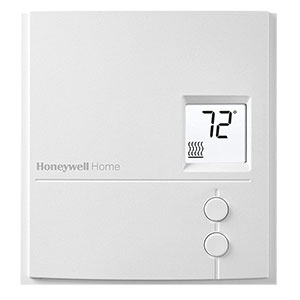
Read customer ratings and reviews for the Honeywell Home CW200A1032 Winter Watchman Thermostat, Non-Programmable. Learn what other customers have to say about their experiences, including what they liked, how the Honeywell Home Winter Watchman Non-Programmable Thermostat - CW200A met their expectations, and any concerns they encountered. These firsthand perspectives can provide helpful information beyond the standard product description.
Browse the reviews to compare customer ratings, explore positive and critical feedback, and make a more informed purchasing decision. If you've purchased or used this product, we encourage you to share your experience and help other shoppers find the right product for their needs.