


Customer Reviews For The Honeywell Digital Infrared Heater Black, HZ-970B

Overall Rating
Product Reviews
Product FAQs
Confirm that the electrical outlet is working and then check if the batteries in the remote are operational.
Confirm that the electrical outlet is working and then check for any obstructions. If an obstruction is found, turn heater OFF, unplug, allow to cool and remove obstruction.
Confirm heater is not tipped and safety tip over switch is activated. If error code E1 is illuminated in Temperature Display, the heater is in tipped position and will remain off until moved into upright position.
HZ-970B Video Guide
Watch this helpful video to learn more about the Honeywell Digital Infrared Heater Black, HZ-970B.


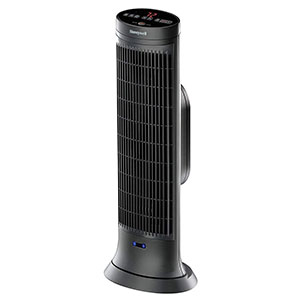


Read customer ratings and reviews for the Honeywell Digital Infrared Heater Black, HZ-970B. Learn what other customers have to say about their experiences, including what they liked, how the Honeywell Digital Infrared Heater Black, HZ-970B met their expectations, and any concerns they encountered. These firsthand perspectives can provide helpful information beyond the standard product description.
Browse the reviews to compare customer ratings, explore positive and critical feedback, and make a more informed purchasing decision. If you've purchased or used this product, we encourage you to share your experience and help other shoppers find the right product for their needs.